The Muse API won’t help you track Muse

Crockett Ford
sunbeam Research
12 min read

Muse launched on September 8th and has now surpassed 10 million users, according to Meta’s latest earnings call. In the same call, Zuckerberg said that more than a quarter of Muse users are making purchases through the app, with an average purchase over $200.
Brands want any advantage possible when marketing to new agentic shoppers. If the entire process from discovery to purchase is decided by an agent, how do you compete? Before you can even strategize, how do you know where you stand?
Since Muse is a tightly integrated personal agent tied directly to each user’s Meta account, realistic simulation of users at scale is noncompliant and complicated.
To get around this, some analytics vendors have started offering Muse’s LLM API as a proxy for brand visibility in Muse. Some vendor marketing frames this as measuring the Muse app itself, but many indicate it’s the LLM API in the fine print.
Does measuring the Muse API tell you anything about the products the app picks?
We dug deep into how the Muse app shops to find out.
Summary
- Most brands named by Muse do show up in API answers, but the API names far more. For the same queries, the app showed only 20 of the roughly 50 brands the API named. Measuring brand visibility via the API is likely to produce false positives.
- Tracking citations in the API is too noisy to tell you if Muse is engaging with your site. The API retrieved nearly 2000 unique domains. The app only retrieved 91 domains. They shared 43. Your site appearing in the API’s citations tells you little about what Muse does.
- Most products are selected by the browser agent from large retailers. The browser agent only sees a short instructional brief. On a fresh account, the brief is generic. With more user context, Muse names products and stores based on inferred user preferences, all before any searches occur. The browser agent’s choices constituted 64% of the final shortlist across all our tests. Only 36% came from the main agent’s catalog searches.
- The more Muse knows about a shopper, the less the API can tell you. Early requests matched the API. As context grew, Muse inferred more about our intent, resulting in more specific briefs for the browser agent and final recommendations less similar to the API’s. Muse users may have weeks or months of memory, emails, and social media activity that Muse monitors and uses to make decisions.
Method
Getting statistically significant measurements about the Muse app’s product picks is difficult. Muse is tied to the user’s Meta account, making large-scale, automated sampling impractical and in violation of Meta’s terms. Therefore, we couldn’t measure thousands of real app sessions or run the same prompt dozens of times in identical conditions.
Instead, we opted for a qualitative approach. We ran Muse in a Playwright instance, capturing all network traffic, client-side API calls, every activity thread, and hundreds of browser screenshots per session.
We ran the app, both free and Pro, through 13 shopping runs on a single Muse account (7 with Muse’s free tier, 6 with Pro), manually resetting context whenever a fresh start was needed. Some shopping tasks ran multiple times. We called the Muse API 116 times in total.
After each run, we downloaded all agent-created files from the app’s VM to see exactly what the app read and what it added.
We tested a few scenarios:
- Fresh context with no connections. This is Muse when you log in the first time, before anything is connected.
- Fresh context with Gmail and/or Calendar connected. Muse offers to read some of your emails to learn about you. We tested both with and without this step. With it, Muse checks specifically for previous purchases, subscriptions, and travel.
- Continuous usage with Gmail and Calendar. This most closely approximates how real users interact with Muse. We asked Muse to complete a series of tasks to see if its behavior changed as context accumulated.
For the third scenario, we simulated a user building a desk setup. We asked Muse to help us pick a monitor, monitor arm, keyboard, mouse, and headphones, all in separate side chats in the same account. The linked Gmail contained a seeded product recommendation presented as a friend’s recommendation. Muse only found it after we hinted at it (“I think a friend emailed me about a monitor recently, can you take that into account?”).
We also asked for running shoes on an account with no connections, and for carry-on luggage on an account with Gmail and Calendar connected. The inbox held a Delta flight receipt for a trip that week.
Every query we ran in the app was repeated via the API 3 to 9 times for both Spark 1.3 and Wonder 1.0, to compare final output.
How does Muse shop?
Muse follows a clear series of steps each time it receives a new purchase query.
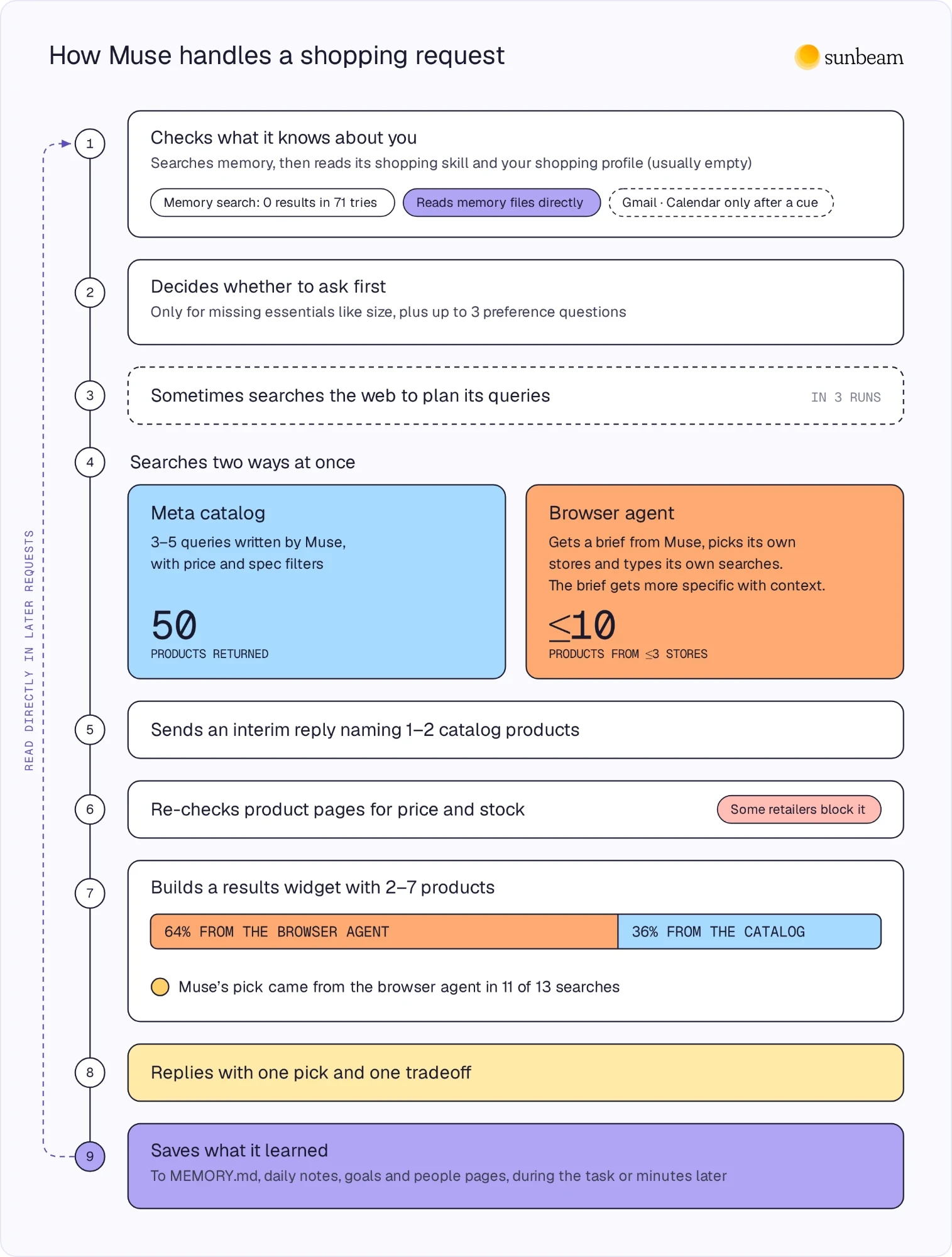
- Muse always searches memory first.
- Muse searches tightly scoped queries immediately relevant to the topic, e.g., “Crockett monitor preferences,” “monitor 32 inch budget,” “Crockett programming games setup.”
- Muse reads the shopping skill.
- Muse always tries to read the shopping profile.
- Muse directly reads files like MEMORY.md, daily notes, goal files, or people pages.
- Muse then decides whether to ask clarifying questions about essential information (like size) and preferences. When it found related context, it often skipped these entirely.
- Muse sometimes runs a web search to narrow its queries. This only happened three times.
- Two searches launch in parallel:
- Meta’s catalog: 3-5 queries written by the main agent (generic, brands, or specific models) with filters like price and required attributes. This returns 50 products. Some coverage says Muse uses the Shopify Catalog. The catalog connector Muse read in every run was the Meta Catalog.
- Browser agent: the main agent hands a brief to the browser agent. This brief varied substantially. Sometimes it had only generic requirements with no brands or products mentioned. Other times it named specific brands or models to check. Searches with more initial context tended to be more specific. The browser agent picks its own stores unless the brief names them, types its own searches, and returns a report.
- The main Muse agent lists 1-2 products it found in the catalog and tells the user to wait for the browser search to complete.
- After the browser agent returns its list, the main agent opens some product pages to confirm price and stock a second time. Some retailers block these requests.
- The main agent creates a results widget with 2-7 products, generally ranking by fit, direct sellers, well-known retailers, verified discounts, and reviews.
- The main agent writes the final reply and recommendation.
- The main agent commits information to MEMORY.md, daily notes, people pages, or goal files either during the task or minutes later. The information created here was used the most consistently by the agent in later runs.
When Muse detects relevant cues in the user’s input, it checks connected apps. With richer context, Muse read more at the start of the process, and cues inside user queries (such as a reference to an email or trip) would sometimes lead it to check Gmail or Google Calendar.
The browser agent and its brief
64% of the products Muse showed us (37 of 58 total result slots), and 11 of its 13 top recommendations, came from the browser agent’s report. This matches Profound’s test from last month, where about 4 of 6 products shown came from the browser agent. Profound tested one category. We saw the same pattern across seven.
The browser agent acts entirely on a single piece of context passed in by the main agent: the brief.
How the main agent writes the brief significantly affects the browser agent’s behavior.
On a fresh account, we asked for a computer monitor recommendation with the following preferences: “32 inches, <800 usd if possible, I don’t really care if it’s oled [sic] or anything too fancy, I’m mostly just using it for normal desktop use, programming, and playing single-player games…I care more about reliability.”
The resulting brief restated the request and added a fixed template specifying how many sites and products to check:
Find a 32-inch computer monitor under $800 USD, for normal desktop use, programming, and playing single-player games. The user does not care if it’s OLED or anything too fancy, super high refresh rate or perfect color fidelity aren’t necessary, and reliability matters more. Find real purchasable products online for: a 32-inch computer monitor under $800 for desktop use, programming, and single-player gaming. Preserve these requirements: 32-inch size, price under $800 USD, suitable for programming and single-player gaming, reliable brands/models preferred. Unless instructed otherwise, default to searching a maximum of 3 merchant sites and a maximum of 10 products in total […]
Later, on an account with some history, a simpler, one-line request (“can you recommend a mouse?”) produced a brief assembled from earlier chats, with four specific mice and stores to check:
Find a mouse recommendation for a user who does programming, normal desktop use, heavy typing / all-day desk work, and single-player games (not competitive esports). Priorities: reliability, comfort for long sessions, quiet clicks preferred (they prefer quiet gear), wireless preferred, no crazy high-end specs needed. Find real purchasable products online for: Logitech MX Master 3S, Logitech MX Vertical, Logitech Signature M650 / M650 L, and Keychron M6 if available. Preserve these requirements: wireless, quiet or not loud clicks if possible, suitable for programming and single-player games, reliable brand. Search a maximum of 3 merchant sites and a maximum of 10 products in total - prefer official Logitech store, Best Buy, Amazon, or Keychron official if needed. […]
For the second brief, none of the priorities listed came from the chat. They were inferred from discussions about different products. Specifically:
- “they prefer quiet gear”—this came from a discussion about mechanical keyboards, where we requested one that was “not crazy loud.”
- “heavy typing / all-day desk work”—this came from multiple discussions, including the keyboard and computer monitor chats.
- “single-player games (not competitive esports)”—this came from the monitor chat.
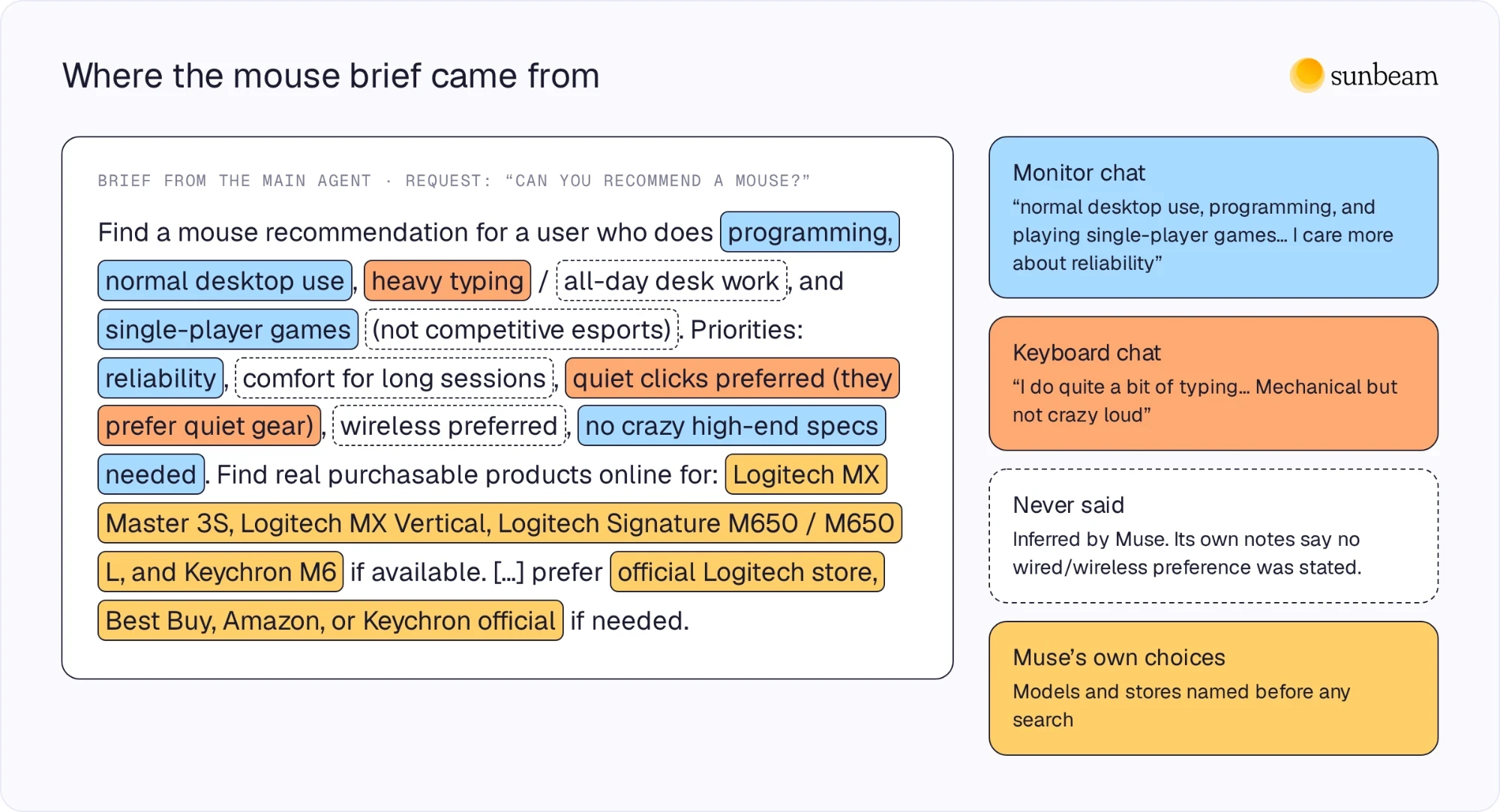
All of these chats were done in side chats, which lack the conversational context of other threads, including the main one. Instead, Muse found this information in the shopping profile, goal files, and daily note.
In this case, with rich context about the user’s use case and preferences, the main agent directly instructed the browser agent what to check and where to check it.
How does Muse choose stores?Its shopping skill tells it to cover the brand’s official store and a few established retailers, such as Walmart, Target, or Best Buy, plus a specialist shop when the item calls for one. With a generic brief, the browser agent chose for itself. It went to Best Buy in all four free monitor runs, then Newegg, B&H, Amazon, or Dell.com. For shoes, it went to Running Warehouse and Road Runner Sports, and for the carry-on to Nordstrom, Macy’s, and Target.
Can the API stand in for the app?
It’s complicated. Most brands the app showed appeared in the API’s answers, but the API mentioned far more. They retrieved mostly different sources.
To understand why the app and API differ, we should compare how they each handle user requests and find product recommendations:
| Muse app | Muse API | |
|---|---|---|
| Model | Spark; Wonder on Pro | Spark 1.3 or Wonder 1.0, chosen by the caller |
| Instructions | 31.5 KB shopping skill | None |
| What it knows about you | Memory files and chat history; Gmail and Calendar after a cue | Only what’s in the prompt |
| Questions | Before searching, when essentials are missing; skipped when it had context | After answering, if at all |
| Where products come from | Meta’s catalog (50 per search) and a browser agent on retailer sites (up to 10), steered by the main agent’s queries and briefs | Its own knowledge and web search results |
| Sources it reads | Catalog listings, retailer sites and brand stores; review or publisher pages only in its own web searches (3 runs) | Publisher and brand-site pages; retailer pages appear in its results but were never cited for monitors |
| Checks | Opens product pages to confirm price and stock | None |
| Output | 2–7 listings with merchant, price and stock, and one pick | Models and price ranges |
Brands mentioned by the app and the API do frequently overlap.
However, the overlap only runs one way. The app named 22 brands total across 7 categories. The API named 20 of those same brands, but named an additional 32 never mentioned by the app.
Gigabyte was in 31 of 43 API answers about monitors, Razer in every mouse answer, and NuPhy in 12 of 18 keyboard answers. None of them appeared in the app.
The difference is partially explained by what the app and the API each browse and return. The app returns a smaller set of products checked for availability and price against retailer sites and brand product pages. The API names alternatives, budget picks, and brands to avoid, often based on reviews and brand content.
Sources rarely overlap. The app’s products came from merchants and retailers. Meta’s catalog, retail sites the browser agent searched (Best Buy, Amazon, Newegg), and some specific brand sites’ product pages (Dell) comprise the vast majority of sources viewed by either agent in the Muse app.
The Muse app read third-party or blog content only in the main agent’s web searches, which were rare (only 3 of our observed runs).
The API’s citations were almost entirely reviews, third-party content, and brand-site pages. In the monitor runs, it cited 0 retailers, even though retailer pages turned up in its search results.
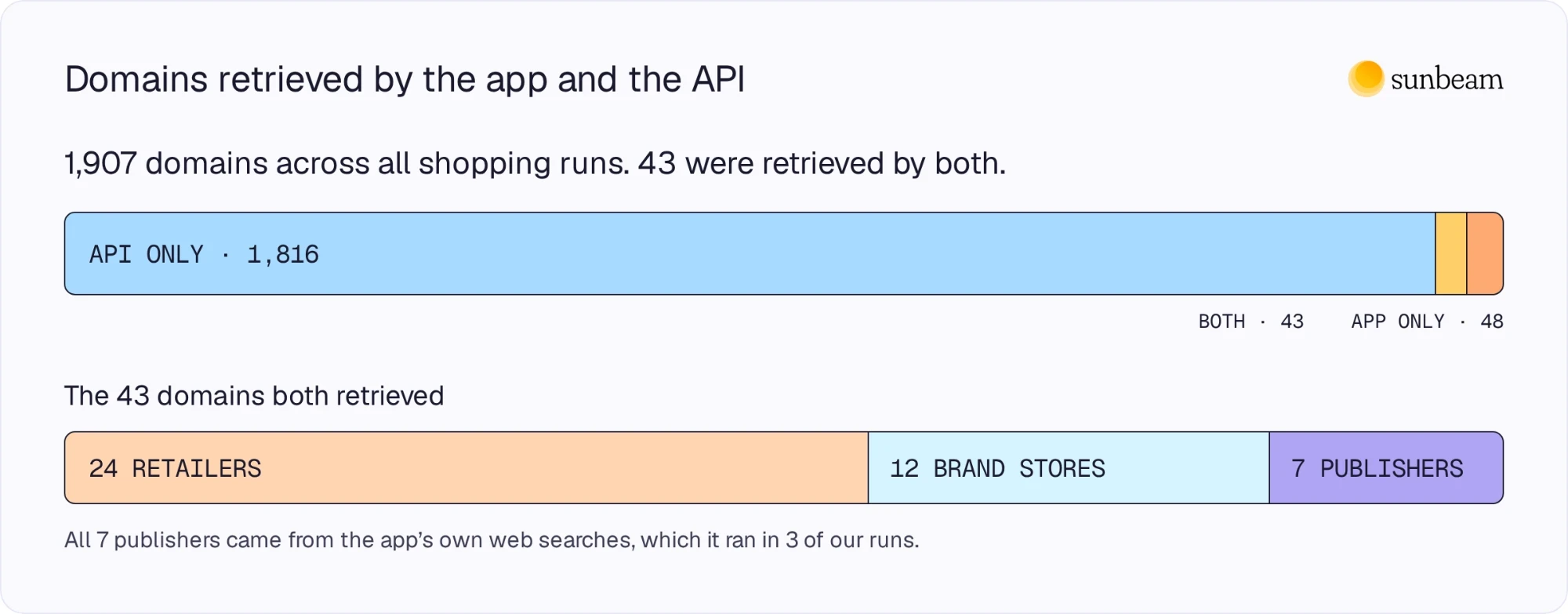
Only 43 of the total 1907 domains were retrieved by both the app and the API. The total number is inflated by the API, which retrieved ~20x more domains than the app, at 1859 and 91, respectively. The overlap is mostly big-box retailers and brands’ own product pages.
Did context change the products recommended?
At first, the app and the API often recommended the same brands and similar products. As context built up, they started to drift apart.
Our desk setup, in order:
| Request | Context Muse used | App’s top recommendation | API’s top recommendation |
|---|---|---|---|
| Monitor | None (fresh account) | Dell P3225QE | Dell P3225QE (Wonder’s most common) |
| Monitor arm | Monitor weights from memory | Ergotron LX Pro | Ergotron LX or LX Pro (6 of 6) |
| Keyboard | Our answers | Keychron V1 Max | Keychron V1 Max (Wonder, 3 of 3, with our answers) |
| Mouse | Profile built from 3 earlier chats | Logitech MX Master 3S, no gaming mice | MX Master 4 (5 of 6), gaming mice in 6 of 6 |
| Headphones | Desk-setup goal and our answers | Audio-Technica ATH-M50xBT2 | Sennheiser Momentum 4 (4 of 6, with our answers) |
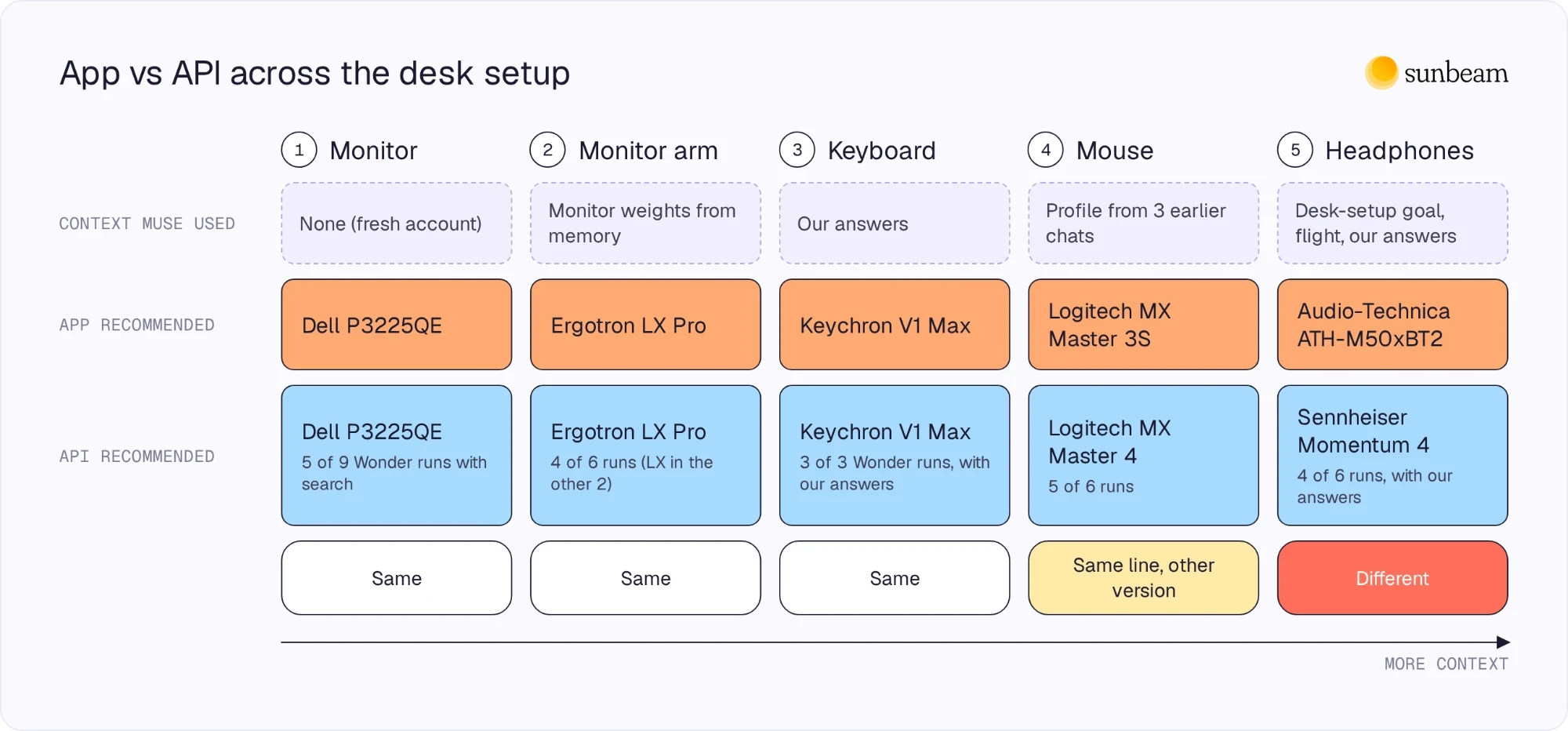
When both the app and API have similar context—either none or the same information—they recommend the same products. When given the same list of preferences, both the app and the API recommended the Keychron V1 Max.
However, as context around our desk setup grew, the context that the API couldn’t see played a decisive role in Muse’s interactions and recommendations.
The headphones are the clearest example. We asked, “Can you recommend some headphones?” in a new side chat. Muse read the desk-setup goal it had written from our earlier chats, worked out that we were building a desk setup, and asked about it:
Main use—long desk / programming sessions, travel (that flight Saturday would make noise-cancelling matter), or both? Form you prefer—over-ear wireless, earbuds, or a wired set that just lives at your desk? Budget—thinking around $100-150, $250-350, or open to more if it’s a buy-it-for-years pick?
Nothing in the chat mentioned a desk, programming, or a flight. The desk and programming came from the goal file. Muse knew about the flight after reading our inbox earlier.
We said mostly at the desk, and Muse recommended the Audio-Technica ATH-M50xBT2: “For longevity at a desk, the simpler design wins—fewer features to fail, and a wired fallback when the battery eventually fades.”
Without our answers, the API led with the Sony WH-1000XM6 in all 12 runs and never named Audio-Technica. With the same answers, it led with the Sennheiser Momentum 4 in 4 of 6 runs and named the Audio-Technica in 2.
Specific cues in our messages could trigger Muse to search connected apps, after which it would commit that information to memory.
When we mentioned a friend had emailed us about a monitor, Muse found the email, prioritized the friend’s recommendation (a brand that never appeared in an API answer), and created an internal note about the friend and the specific monitor.
More obliquely, when we mentioned needing a carry-on for “my trip this week,” Muse proactively searched the connected Gmail, found our airline receipt, and identified a carry-on available for pickup at Macy’s Union Square before our flight. Without the same flight and location details, the API didn’t name any store at all.
Muse’s answers were the most different from the API’s when context was available. Muse’s available context grows with time and normal use. Days after our tests, Muse had independently monitored our emails and appointments in the background, building a more complex picture of who we were.
Our account was a few days old. A heavy user’s account has months of memory files, goals and people pages, and a full inbox. We’d expect:
- More briefs like the mouse brief, with models and stores chosen before the browser agent searches.
- Fewer clarifying questions.
- More recommendations driven by the inbox: past purchases, friends’ suggestions, travel.
- Less overlap with the API, which sees none of it.
What this means for brands
Meta’s LLM API is a weak proxy for Muse. It may have some niche applications, but no brand should rely on it to “measure” their presence in Muse.
Tracking the API may tell you which brands are in the running, but not what Muse recommends. For fresh, generic requests, the API often named the same brands as the app. It often didn’t name the same products, versions, or stores. Importantly, it named many brands the app never showed, meaning false positives are likely.
The overlap in recommended brands may reflect market share more than model preference. Many of the brands named by both dominate their respective categories: Logitech for mice, Dell for monitors, Ergotron for monitor arms, Keychron for keyboards. If you must measure the API, spot-check for similar overlap in your own category and take it with a grain of salt.
API citations will not tell you whether Muse is likely to visit your site. The API cites third-party review publishers and brand sites. Third-party reviews rarely appear in Muse. The API retrieves and cites so many more domains than the app that using it to measure Muse is largely pointless.
Muse relies on product pages. Its products came from Meta’s catalog and retailer sites. The browser agent searched retailers and supplied 11 of 13 top recommendations. Before recommending anything, the main agent opened brand and retailer product pages to check price and stock. Clear, correct availability and price information lets Muse make accurate decisions about your products.
Measuring the API over time to track your visibility in Muse is a mistake. It cannot realistically simulate a user. Be skeptical of claims to the contrary.